·
Steeve Elgui
UX UI Design Explained: Differences, Process and Testing
UX UI design explained: what UX and UI each do, how research, interface design and testing fit together, and where to start on your next project.

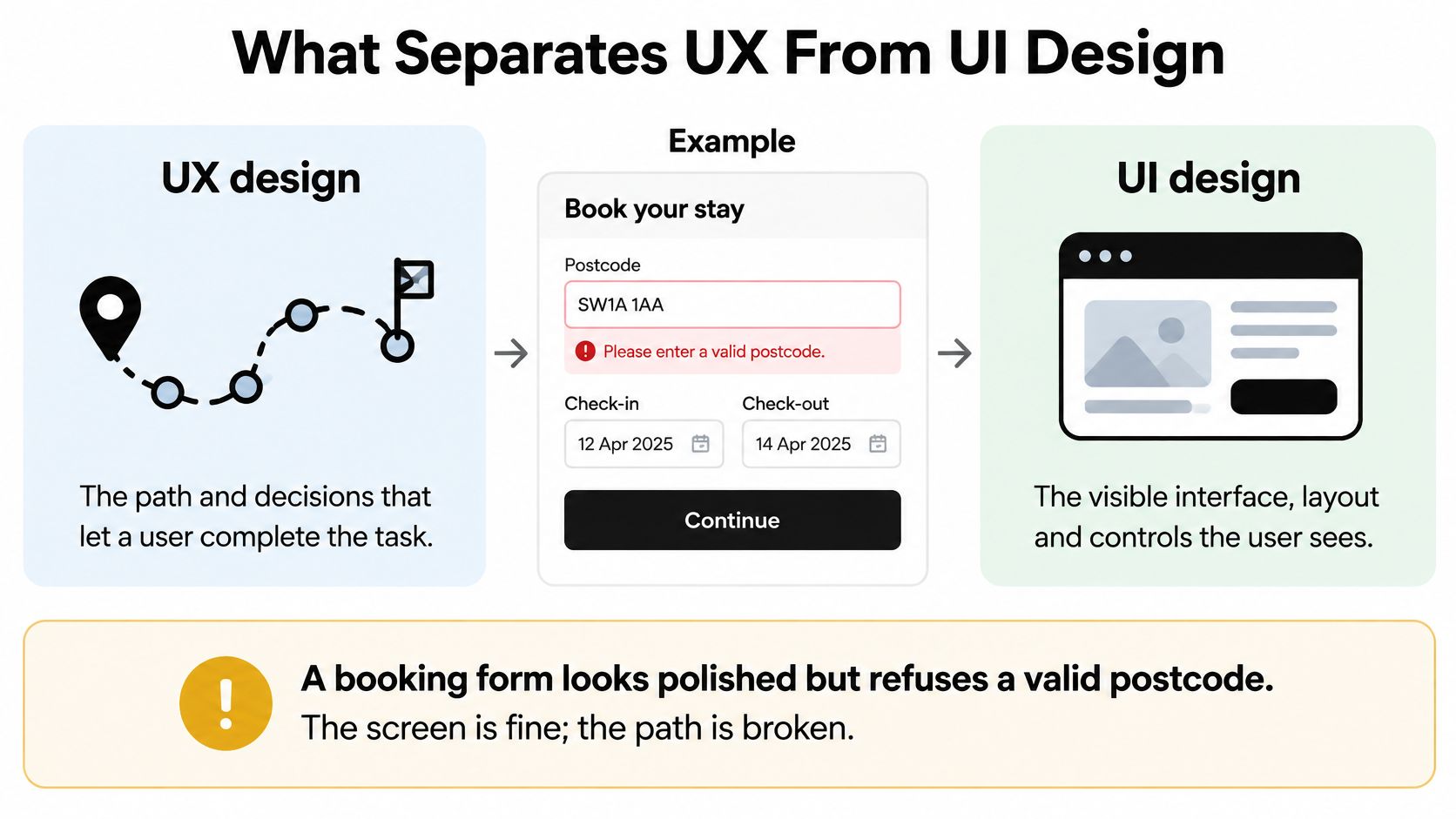
The booking form looks finished. The type is sharp, the spacing feels calm, and the button is easy to find. Then it rejects a valid postcode, clears the address and leaves the person booking with no way forward.
That's where UX UI design stops being a discussion about screens. We need to trace the decision behind the failure: who defined the address rules, who designed the recovery, and who tested the path with realistic information?
What Separates UX From UI Design
UX design decides what happens and in which order: who the person is, what they need to achieve, and the steps between arrival and completion. UI design decides how each step is presented and operated through typography, spacing, colour, controls, messages and interaction states.
Think of a house. UX is the floor plan and the route between rooms; UI is the finish, door handles and light switches. A sensible floor plan still needs switches people can find, and beautiful handles won't fix a door that opens into a blocked corridor.
UX design and UI design compared
Aspect | UX design | UI design |
|---|---|---|
Core question | Can people reach their goal without friction? | Is each screen and control clear and consistent? |
Main outputs | User journeys, flows, wireframes, prototypes | Visual layouts, typography, colour, components, states |
Typical tools | Research notes, journey maps, Figma prototypes | Figma with design systems and component libraries |
Success signal | Task completion, time on task, drop-off points | Recognition, consistency, correct use of controls |
Where it fails | Users cannot finish the task | Users misread or miss controls |
Different responsibilities, shared decisions
UX isn't only wireframes. It includes deciding whether an address lookup needs a manual-entry alternative, what information the service needs, and how someone resumes an interrupted booking.
UI isn't making those decisions pretty. A persistent label, an unmistakable selected state and an error beside the relevant field determine whether someone can operate the flow. Those are functional decisions expressed visually.
For a complementary explanation of the boundary, Uxia's guide to user experience versus interface design is useful when a team needs shared language before reviewing work.
The split helps assign responsibility, but it shouldn't create separate approval silos. A UI designer who spots an impossible interaction must be able to challenge the journey, rather than decorate it.
Good UI on weak UX is a nice dead end, while weak UI on good UX still gets people home but tires them out.
How Research, Interface Design and Testing Connect
Phases of a UX and UI project
Phase | Question it answers | Typical output |
|---|---|---|
Discovery and research | Who is this for and what do they need? | Interview notes, analytics review, benchmark set |
Journey mapping and structure | Which path gets them to the goal? | User journeys, sitemap, low-fidelity wireframes |
Interface design | What does each screen look like and behave like? | High-fidelity UI in Figma, component states, design system entries |
Prototype testing | Does the path work before we build it? | Clickable prototype, task test notes, revised flows |
Build and implementation | Does the built product match the design? | Shipped pages, QA checklist, accessibility check |
Post-launch review | What do real users still struggle with? | Analytics, support tickets, next iteration brief |
Every output becomes material for the next phase. An attractive deliverable isn't enough: the next person needs the evidence, unresolved questions and acceptance criteria behind it.
In discovery and research, skipping people who use the service creates a specific risk. The team might interview account owners but miss the administrators who enter information every day. Journey mapping and structure then formalises the wrong assumptions, and interface design makes them look settled.

Make the handover carry the reasoning
In interface design, the handover should explain why a field exists, not just its width. If research identifies shared devices, for example, session behaviour needs discussion before anyone approves an account screen.
Wecomeet's Concept & Design phase covers brand identity and visual language, UX/UI design and user journeys, campaign concepts and key visuals, and design systems and reusable assets. The useful process question is which decisions need to be resolved together, rather than passed between disconnected files.
Prototype testing exposes broken paths while the team can still change the model without rebuilding production behaviour. A clickable prototype is cheaper to revise, but it cannot prove that validation, assistive technology or a live integration works.
Build and implementation therefore needs its own acceptance work. Designers and developers should compare the browser against intended behaviour, not merely compare screenshots.
Close the loop after release
Post-launch review combines support tickets with journey analytics to identify problems that controlled sessions missed. A rise in address errors should produce a revised rule or interaction, not another decorative refresh.
Wecomeet's UX/UI or digital redesign projects typically take 4–10 weeks. A delivery window still needs explicit review points; compressing the schedule shouldn't mean removing validation.
Before work starts, the team should answer:
Deliverable: Which usable output does each phase leave behind?
Approval: Who signs it off, including unresolved risks, before the next phase starts?
Research Methods That Shape the Interface
Say a beauty store's analytics shows shoppers leaving during shade matching. Interviews reveal that they understand the selector but fear buying the wrong shade. A sample request and clearer returns information address that uncertainty; a brighter button doesn't.
Evidence needs to distinguish a navigation problem from a confidence problem. Otherwise, the team can produce a polished solution to the wrong question.
Choose the method by the uncertainty
User interviews uncover motivations, vocabulary and workarounds. Ask about a recent decision and what happened, rather than whether someone likes a proposed feature.
Analytics identifies where people leave or repeat actions. Check event definitions before treating a funnel as an accurate account of behaviour.
Card sorting tests how people group content and name categories. It helps when internal departments have become the navigation structure.
Competitor benchmarking identifies familiar interaction patterns. Record the problem each pattern solves rather than copying its appearance.
Short surveys help assess the spread of an already-defined concern. They work poorly when vague questions ask respondents to diagnose the product.
Figr's guide to user research techniques offers a useful method-selection reference. The choice should follow the uncertainty, not the team's favourite workshop format.
Every Wecomeet project begins with strategy, insights and benchmarking, aligning design decisions with business objectives and user needs. The Busuu project also provides a reference for ongoing website maintenance and graphic design support, where the product continues changing after an initial delivery.
AI can organise evidence, not replace it
The UK AI Labour Market Survey 2025 found that 97% of respondents reported at least one skills gap. That finding concerns the AI labour market, but it reinforces a useful distinction: access to tools isn't the same as capability.
AI can cluster notes, propose variants and accelerate repetitive production. Researchers still need to check summaries against original material, protect participant information and distinguish observed behaviour from generated interpretation.
A plausible explanation isn't a research finding.
Before anyone draws a screen, answer:
Person: Who needs to complete this task, and under what conditions?
Obstacle: What evidence explains the difficulty?
Decision: What would make the team change its proposed approach?
From Journeys to Components in Interface Design
A journey becomes useful interface work when the team translates each decision into content, behaviour and reusable parts. Starting with polished screens skips the awkward questions that usually determine whether the product works.

Map the journey and its decisions. Include alternative routes, permission limits and recovery. A booking journey needs a response when the preferred appointment disappears, not just when everything succeeds.
Sketch low-fidelity wireframes. Test information order before styling. If the task depends on information hidden beneath an unrelated section, visual polish won't repair the structure.
Build high-fidelity UI in Figma with real content. Use realistic product names, translated labels and awkward text lengths. Neat placeholder copy conceals layout problems.
Design every relevant control state. Specify default, hover, focus, active, disabled, loading and error behaviour. Explain why a disabled action is unavailable and what makes it available.
Turn repeated parts into components. Define tokens for colour, typography and spacing, then document exceptions. A component library without usage rules encourages inconsistent combinations.
Hand over behaviour alongside appearance. Include keyboard order, accessible names, validation timing and what happens after success or failure. Developers shouldn't have to infer interaction rules from a static frame.
Components carry the consequences
A component system resembles LEGO: copying a faulty brick throughout the product creates a systemic fault. Accessibility and consistency become repeatable decisions, rather than individual designers having to remember every rule.
For UK public-sector services, government accessibility guidance identifies WCAG 2.2 Level AA as the required standard, including criteria affecting focus treatment and alternatives to some drag-based actions. These requirements belong in interaction specifications before visual approval.
Clear focus, readable contrast and semantic structure need implementation notes as well as Figma examples. A visible heading in a design file doesn't guarantee a meaningful heading structure in the browser.
The Depop design-system project provides a related reference for bringing brand, product and partner guidance into a searchable place. Documentation matters when people need to apply a system without its original designer beside them.
Watch the fragile details
The most damaging omissions are often small on the canvas:
Missing error recovery: The message identifies failure but offers no next action.
Removed focus rings: A clean screenshot comes at the expense of keyboard orientation.
Placeholder-only labels: The field loses its explanation as soon as someone starts typing.
Testing Usability and Accessibility Before Launch
Most frequent accessibility issues in UK public-sector monitoring
Issue type | Share of recorded issues |
|---|---|
Insufficient visible keyboard focus | 13.3% |
Inadequate text-to-background contrast | 13.0% |
Keyboard-operability failures | 10.8% |
Poor responsive reflow | 9.2% |
Incorrect accessible names, roles or values | 8.6% |
The table draws on Government Digital Service accessibility monitoring, which assessed 1,203 public-sector websites and 21 mobile apps between January 2022 and September 2024, recording 29,787 issues across nearly all monitored services. At retest, 55.3% of recorded issues had been fixed, while 12.4% remained unresolved.
These are public-sector findings, not a score for every digital product. They provide a practical test-plan benchmark: interaction, legibility and responsive behaviour deserve direct checks, not assumptions based on visual approval.
Test the task, the implementation and the conditions
Moderated usability testing checks whether people can complete realistic tasks without coaching. Give participants a goal, such as changing an appointment, rather than naming the control they should click. Ask them to think aloud, but record observed actions separately from their explanations.
An accessibility pass checks the implemented product with keyboard-only navigation, a screen reader and enlarged content. Follow the whole journey, including menus, dialogs, validation and confirmation. Automated tools help find detectable defects, but they can't establish whether instructions make sense.
Testing with disabled participants reveals barriers that checklist-based inspection misses. AbilityNet's 2025 survey found that only 36% of organisations conduct user testing with disabled people. Recruitment should reflect the interaction risks being investigated, rather than treating disability as a single test category.
Connected physical and digital services also need realistic context. A project such as Amazon Salon, with identity applied across signage, a website and print, is a useful prompt to check whether names and instructions remain understandable between touchpoints.
Prioritise blockers, then prove the repair
GOV.UK's accessibility audit approach assessed issues through conformance, impact on task completion and frequency or likelihood of exposure. That gives teams a stronger triage method than sorting by visual prominence.
Practical rule: A recurring blocker deserves attention before a rare cosmetic inconsistency.
Log the affected journey, reproduction steps, expected behaviour and user impact. Assign an owner and an acceptance condition that another person can verify.
Retest the original failure after the fix, then check neighbouring interactions. Closing a ticket isn't evidence that the person can now finish the task.
Designing for Slow Connections and Uneven Devices
Ofcom's 2025 Mobile Matters analysis recorded 4G carrying 70.7% of UK connections, with 5G at 28.3%.
UK mobile connection speeds in 2025
Connection type | Share of UK connections | Averaged below 10 Mbit/s | Core activities above 5 Mbit/s |
|---|---|---|---|
5G | 28.3% | 8% | 96% |
4G | 70.7% | 28% | 85% |
The connection-share column sets the design priority. The connection type people use is 4G, and more than a quarter of those connections averaged below 10 Mbit/s. Even on 5G, 8% of connections fell under the same threshold, so speed is a variable to design around, not a baseline to assume.
The below-threshold column argues against making large media downloads a prerequisite for using the page. Serve appropriately sized images, defer video the journey doesn't need and keep core content readable before decorative assets finish loading.
Design for delay without losing control
The core-activities column describes network capability, not a guarantee that a particular interface will work. A heavy page can still perform badly on a capable connection.
Reflow the layout: Stack content according to reading order instead of shrinking a desktop composition.
Explain waiting: Distinguish loading, successful submission and failure so people don't repeat an action unnecessarily.
Preserve work: Keep entered information when a request stalls, and offer a clear retry route.
Keep core actions available: Don't let an unloaded image or animation prevent navigation.
Each of these decisions is where accessibility gets settled in practice. A control that only appears after a video buffers, or a form that clears itself on a dropped request, excludes the people most likely to hit those conditions: older devices, capped data plans, weaker coverage.
Test the core journey under throttled 3G and 4G profiles on a mid-range phone. Browser throttling is useful, but it doesn't reproduce every limitation of an actual device, so confirm at least one run on real hardware.
Inspect layout movement, delayed controls and the behaviour after a connection drops during submission. A spinner that never resolves is an interaction failure, even when the underlying cause sits in an API.
Performance belongs in design acceptance criteria. Give slow loading and stalled requests named owners rather than leaving them as loose notes for engineering.
Start With One Journey Before You Draw a Screen
A focused starting point makes design decisions easier to challenge. Choose a journey narrow enough to investigate properly, but important enough that improving it changes someone's ability to use the product.
Choose the journey that matters most. Booking, account recovery or product selection are useful candidates when failure prevents the main task. Avoid starting with the homepage because it's the most visible screen.
Write a measurable outcome. Completion rate or time to finish can provide a baseline. Define what completion means and which users belong in the measurement before comparing results.
Name the decision owners. Research, interface design and testing each need someone authorised to approve the work and resolve disagreements. Approval should include known risks, not just a finished file.
Book accessibility and performance checks before the build starts. Reserve people, devices and review time while the schedule can still accommodate changes. A test that nobody has time to act on offers little protection.
Let identity and interaction inform each other
Brand identity and UX/UI can run within the same project, aligning strategy, visual identity and digital experience. That allows typography, content hierarchy and interaction behaviour to develop together instead of forcing an approved visual system onto an incompatible product structure.
Wecomeet, a branding and UX/UI studio in London and Paris, works on brand identity, UX/UI, Shopify builds and design systems for beauty, fashion and technology brands, with project-based engagements and monthly retainers for ongoing design and optimisation.
An internal team, specialist partner or combined group can take the work forward. What matters is a clear chain from evidence to decisions to tested behaviour. The first useful deliverable isn't another screen; it's agreement about the task that screen must support.
Wecomeet offers research-led UX/UI design, reusable design systems and implementation for websites, e-commerce and product interfaces. Visit Wecomeet to discuss a specific journey, the decisions behind it and the testing needed before it ships.